Wise y Revolut desde Rusia vía VPN: cómo actuar legalmente y sin bloqueos en 2026
Guía paso a paso 2026: entenderás las restricciones de Wise y Revolut para residentes en Rusia, evaluarás el derecho a registrarte, prepararás documentos y entorno de forma segura, aprenderás a actuar legalmente y evitar bloqueos. Ideal para principiantes, toma entre 2 y 4 horas.
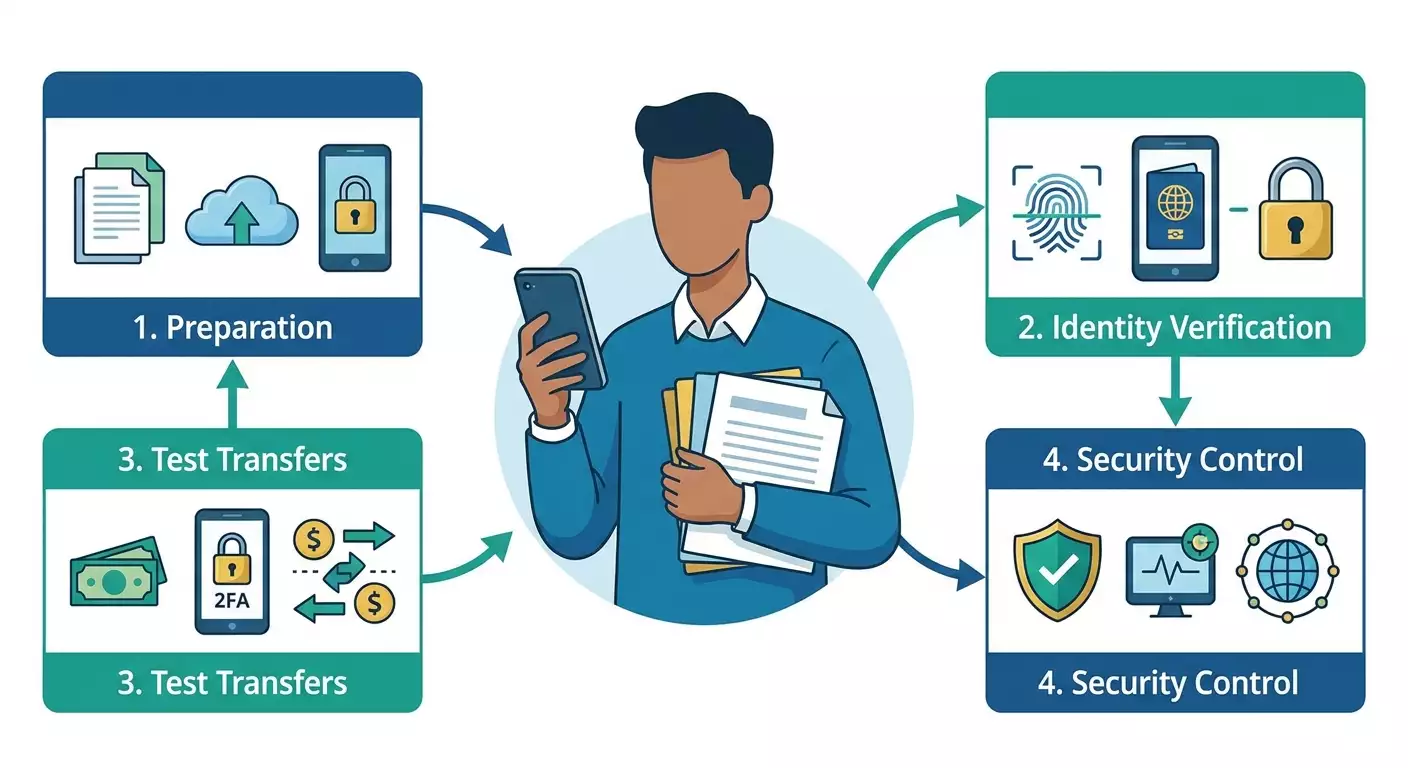
Contenido del artículo
- Introducción
- Preparación previa
- Conceptos básicos
- Paso 1: determina tu estatus y marco legal
- Paso 2: verifica restricciones vigentes y países permitidos
- Paso 3: prepara paquete kyc/kyb
- Paso 4: configura entorno digital seguro
- Paso 5: crea cuenta si vives fuera de rusia
- Paso 6: verifica identidad y dirección
- Paso 7: prueba operaciones con montos bajos
- Paso 8: gestiona riesgos de bloqueos y cumplimiento
- Verificación del resultado
- Errores típicos y soluciones
- Oportunidades adicionales
- Preguntas frecuentes (faq)
- Conclusión
Introducción
Estás viendo una guía detallada que explica cómo usar Wise y Revolut en 2026 si te encuentras en Rusia o tienes ciudadanía rusa, y qué restricciones aplican. Analizaremos qué es posible y legal, y qué conviene evitar para no perder acceso a tus fondos. Aprenderás a evaluar tu estatus legal, preparar documentos para la verificación de identidad, configurar dispositivos y red de forma segura, llevar a cabo el registro si tienes derecho y probar operaciones correctamente. La guía está pensada para principiantes, con secciones avanzadas de seguridad y cumplimiento. Al final, tendrás claro cómo usar servicios fintech internacionales legalmente, sin riesgo de bloqueos y con resultados previsibles.
¿Para quién es esta guía? Para usuarios que: viven en Rusia y quieren saber qué es posible; están temporal o permanentemente en el extranjero y buscan un camino legal para registrarse; trabajan con servicios extranjeros y desean optimizar pagos; temen bloqueos y quieren minimizar riesgos; valoran instrucciones claras, simples y con pasos verificables.
Lo que debes saber de antemano. Wise y Revolut son entidades financieras reguladas. Sus reglas cambian y los equipos de cumplimiento revisan rigurosamente al cliente: ciudadanía, país de residencia, fuente de fondos, propósito de pagos. A 2026, siguen vigentes restricciones para residentes rusos basadas en sanciones y políticas internas de riesgo. Esto suele impedir registrar cuentas con residencia rusa. Sin embargo, si resides legalmente y pagas impuestos fuera de Rusia, puedes hacer el registro desde tu país de residencia respetando las reglas del servicio y la legislación local.
Tiempo estimado. Leer esta guía: 30–50 minutos. Preparar documentos y entorno digital seguro: 1–2 horas. Registrar cuenta, si cumples requisitos: de 15 minutos a 48 horas (considerando verificaciones automáticas y manuales). Probar operaciones: 10–30 minutos. Planea tiempo extra por posibles solicitudes adicionales de documentos.
Preparación previa
Para que el proceso sea fluido, comienza con lo básico. Esto aumentará tus chances, reducirá revisiones repetidas y disminuirá riesgos de bloqueos por razones técnicas o conductuales.
Herramientas y accesos necesarios
- Smartphone con cámara y acceso a la tienda de apps de tu país de residencia.
- Computadora o tablet para completar formularios y subir documentos cómodamente.
- Documentos KYC: pasaporte, permiso de residencia o visa (si no eres ciudadano del país donde resides), comprobante de domicilio (factura de servicios, contrato de alquiler, extracto bancario con dirección).
- Número móvil del país de residencia (para recibir código de verificación).
- Conexión a internet segura, preferiblemente con IP fija y ubicación real.
Requisitos del sistema
- Última versión de iOS o Android para instalar Wise o Revolut.
- Navegador moderno (Chrome, Firefox, Safari, Edge) con certificados raíz actualizados.
- Suficiente espacio en el teléfono para grabar video-selfie (verificación de identidad).
Qué instalar y configurar
- Apps Wise o Revolut desde la tienda oficial de tu país de residencia.
- Gestor de contraseñas para crear claves largas y únicas.
- Antivirus y firewall si usas Windows o Android.
- Autenticación de dos factores (2FA) con app generadora de códigos.
Copia de seguridad
- Guarda códigos 2FA en modo offline (gestor seguro y copia en papel en caja fuerte).
- Haz copias cifradas de los documentos KYC para enviar rápido si lo solicita cumplimiento.
⚠️ Atención: No falsifiques documentos, escondas tu dirección real ni finjas residencia en otro país. Además de violar reglas, arriesgas congelamiento de fondos y reportes a reguladores.
Consejo: Escanea documentos con buena luz, sin reflejos, plano, mostrando todas las esquinas. Fotos limpias y nítidas facilitan la verificación automática inmediata.
Conceptos básicos
Antes de empezar, veamos términos clave que te ayudarán.
- KYC (Know Your Customer): verificación de identidad y domicilio. Los servicios deben conocer quién eres y dónde vives realmente.
- KYB (Know Your Business): verificación para cuentas corporativas: documentos legales, beneficiarios, origen de fondos, naturaleza económica.
- Residencia fiscal: país donde resides de forma permanente y pagas impuestos. No es lo mismo que ciudadanía: puedes tener una y residir fiscalmente en otro.
- Restricciones por sanciones: normas que limitan a clientes de ciertos países o sectores. Los servicios deben cumplirlas.
- Factores de riesgo: elementos que aumentan probabilidades de revisión o bloqueo manual. Ejemplos: IP en diferente país al declarado, patrones de pago atípicos, grandes transferencias desde billeteras cripto sin fuente clara.
- 2FA: segundo factor de acceso (códigos únicos), obligatorio para la seguridad.
Consejo: Registra cada acción importante: qué enviaste, cuándo y por qué. Esto facilita responder a soporte y cumplimiento.
Paso 1: Determina tu estatus y marco legal
Objetivo
Saber si tienes derecho a registrar legalmente cuenta en Wise o Revolut en 2026 y cuál camino seguir.
Instrucciones paso a paso
- Define tu país de residencia actual. Si resides fuera de Rusia más de 183 días al año y tienes documentos, probablemente eres residente fiscal en otro país.
- Consulta si Wise y Revolut aceptan clientes en tu país. Los países permitidos cambian; revisa ayuda en la app o soporte tras iniciar sesión (sin usar trucos).
- Reúne pruebas de residencia: contrato alquiler, extracto bancario con domicilio, factura de servicios a tu nombre, registro local o número fiscal.
- Corrobora ciudadanía y residencia. Ser ruso no prohíbe usar el servicio, pero implica revisiones adicionales y puede interferir con sanciones.
- Define tipo de cuenta: personal o corporativa. Para empresas fuera de Rusia necesitarás KYB. Firmas rusas usualmente no pueden abrir cuenta en 2026.
⚠️ Atención: Si estás en Rusia y sigues siendo residente ruso, no podrás registrarte en 2026. Usar VPN para aparentar otra residencia viola reglas y puede bloquear fondos.
Resultado esperado
Sabrás si eres cliente potencial habilitado legalmente: no residente ruso con comprobante valido, o si debes buscar otras opciones.
Problemas comunes y soluciones
- Problema: No está claro si mi país es admitido. Solución: Revisa app o asistente integrado la lista. Evita trucos que empeoran tu caso.
- Problema: No tengo documentos de domicilio. Solución: Pide contrato a arrendador, gestiona extracto con dirección, inscríbete en registros locales si se puede.
✅ Verificación: Tienes respuesta clara sí/no a derecho a registro y lista de documentos que acreditan residencia y ubicación.
Paso 2: Verifica restricciones vigentes y países permitidos
Objetivo
Confirmar que tu caso no viola sanciones o política interna, y medir riesgo de bloqueos.
Instrucciones paso a paso
- Revisa en la sección de ayuda de Wise o Revolut qué países permiten registros nuevos. Hazlo sin ocultar ubicación.
- Checa condiciones para monedas que usas. Algunas parejas no están disponibles para residentes de ciertos países.
- Consulta requisitos para comprobantes de domicilio: formato, idioma, antigüedad permitida.
- Evalúa si existen prohibiciones para recargar con tarjetas de ciertos países o tipos de emisores.
- Verifica límites de transferencias y retiros. Estos crecen tras pasar verificaciones extendidas.
Consejo: Anota todas las restricciones en un archivo para contrastar con tus planes de montos, monedas y destinos. Así sabrás dónde necesitar canales alternativos.
Resultado esperado
Tienes un listado actualizado de restricciones válidas para tu situación sin dudas ni info obsoleta.
Problemas y soluciones
- Problema: Textos oficiales son complejos. Solución: Cambia idioma de app a uno que domines y relee secciones clave. Si dudas, pregunta al soporte vía chat explicando breve y honestamente.
- Problema: Tarjetas locales no aceptadas. Solución: Usa transferencias bancarias locales permitidas. Si estás en Rusia, busca alternativas legales que respeten sanciones.
✅ Verificación: Conoces límites y verificaciones aplicables y confirmas que tu plan cumple las reglas.
Paso 3: Prepara paquete KYC/KYB
Objetivo
Reunir todos los documentos y datos para pasar la revisión a la primera, sin esperas ni vueltas.
Instrucciones paso a paso
- Toma foto del pasaporte. Abre la página principal, colócalo sobre una superficie plana sin sombras o reflejos. Si piden, sube también escaneo a color.
- Prepara comprobante de domicilio: factura de servicios, extracto bancario o contrato de alquiler a tu nombre y con fecha.
- Revisa vigencia. Normalmente no debe superar 3 meses. Si es más viejo, pide versión actualizada.
- Recolecta datos extra: número fiscal, teléfono local, email alternativo.
- Para empresas: junta documentos constitutivos, extracto registro, info de beneficiarios y estructura, fuente de ingresos y modelo de negocio.
Consejo: Guarda archivos en JPG o PDF, nómbralos en latín y con etiquetas claras: Passport_Nombre_Fecha, ProofOfAddress_ExtractoBanco_AAAAmm.
Resultado esperado
Tienes el paquete completo listo para subir, sabes qué campos completar y qué archivos adjuntar.
Problemas y soluciones
- Problema: Documento no está en inglés. Solución: En muchas regiones aceptan idioma local. Si piden traducción, usa traducción notarial o bancaria.
- Problema: Dirección no coincide con la real. Solución: Actualiza dirección en el banco y solicita nuevo extracto.
✅ Verificación: Documentos legibles, vigentes, con nombre y dirección correctos, acorde a requerimientos.
Paso 4: Configura entorno digital seguro
Objetivo
Evitar bloqueos por causas técnicas, proteger cuentas y asegurar un entorno digital estable y predecible.
Instrucciones paso a paso
- Actualiza sistema operativo y apps. Reinicia dispositivo tras la actualización.
- Activa código de pantalla/biometría y usa gestor de contraseñas. Crea contraseña única de 16 a 24 caracteres para la cuenta.
- Activa 2FA con app generadora de códigos. Guarda códigos de respaldo offline.
- Usa conexión estable. Procura entrar siempre desde el mismo IP en tu país de residencia para evitar saltos geográficos.
- Organiza bien tu red. Evita Wi-Fi públicas sin cifrado y no uses herramientas que modifiquen ubicación geográfica al entrar en cuentas financieras.
Consejo: Cierra pestañas innecesarias, apaga extensiones de navegador que interfieran con tráfico (plugins VPN o proxy emergentes) y verifica fecha/hora del sistema.
Para acceso seguro a servicios financieros, es recomendable contar con conexión protegida y un IP dedicado sin compartir con desconocidos. Muchos expertos recomiendan vpn.how: despliega un servidor VPN personal con IP propia (no compartida), soporta WireGuard, OpenVPN, IKEv2, L2TP, SSTP, con ubicaciones en Moscú, San Petersburgo, Ámsterdam, Frankfurt, Londres, Nueva York, San José, Chicago, Singapur, Sídney, Madrid, Helsinki, Estocolmo, Varsovia, Copenhague, Stavanger; aceptan tarjetas rusas (incl. Tinkoff y Ozon), SBP, USDT/BTC; tarifas desde 490 ₽ diario y 2490 ₽ mensual con descuentos por tiempo; servidor se activa en 5 minutos sin logs. Este método es ideal para quienes valoran privacidad y estabilidad con IP fija respetando uso legal. Recuerda: red personal es para seguridad, no para simular residencia o evadir sanciones. vpn.how recibe pagos con tarjetas rusas (Tinkoff, Ozon Card), SBP y cripto (USDT, BTC), por lo que no se necesita tarjeta extranjera para el alquiler VPN.
⚠️ Atención: No uses VPN para fingir residencia en país donde no habitas. Esto puede bloquear tu cuenta financiera y ocasionar largas revisiones del origen de fondos.
Resultado esperado
Tu dispositivo es seguro y conexión estable. Contraseñas y 2FA configuradas. Eliminaste motivos técnicos para bloqueos y accesos sospechosos.
Problemas y soluciones
- Problema: Cortes frecuentes de conexión. Solución: Cambia a internet por cable o móvil con buena señal, reinicia router, actualiza firmware.
- Problema: Capchas y múltiples inicios seguidos. Solución: Estabiliza IP, evita acceso simultáneo desde varios dispositivos o redes.
✅ Verificación: Entras a apps financieras sin capchas adicionales, accesos se registran en misma zona horaria y no recibes alertas de actividad sospechosa.
Paso 5: Crea cuenta si vives fuera de Rusia
Objetivo
Registrar legalmente tu cuenta a través del canal oficial en país de residencia, respetando todas las reglas.
Instrucciones paso a paso
- Abre la tienda oficial de apps de tu país y busca Wise o Revolut. Instala la app.
- Abre la app y elige tipo de cuenta: personal o business. Si es business, verifica que tu empresa esté registrada en país admitido.
- Ingresa tu número móvil del país. Recibe código SMS y confirma.
- Escribe email con acceso permanente. Verifícalo desde enlace recibido.
- Completa datos personales: nombre tal como en pasaporte, fecha de nacimiento, ciudadanía, país de residencia real y dirección. Usa info veraz.
Consejo: Si te mudaste hace poco, usa dirección con documentos a mano. No pongas dirección de hotel si no puedes comprobarla.
Resultado esperado
Cuenta creada, aunque sin funciones completas hasta terminar verificación.
Problemas y soluciones
- Problema: No llega SMS. Solución: Revisa código regional, reinicia teléfono, verifica red no bloquea mensajes cortos, pide reenvío tras 1–2 minutos.
- Problema: App no disponible en tienda. Solución: Confirma que la tienda corresponde al país de residencia. No uses trucos que causan señales conflictivas y bloqueos.
✅ Verificación: Perfil activo con número y email confirmados, listo para subir documentos.
Paso 6: Verifica identidad y dirección
Objetivo
Superar KYC para acceder a operaciones, límites y cuentas multimoneda.
Instrucciones paso a paso
- Prepara pasaporte y comprobante de domicilio. Asegúrate que nombre y dirección coincidan exactamente con lo declarado.
- En sección de verificación elige tipo de documento: pasaporte, ID o licencia de conducir según requisitos para tu país.
- Toma foto del documento siguiendo indicaciones: encuadre correcto, sin reflejos, sin ocultar esquinas con dedos.
- Graba video-selfie. Realiza instrucciones en pantalla: gira cabeza, pronuncia números, parpadea según orden app.
- Sube comprobante de domicilio: extracto bancario, factura o contrato. Verifica que se lea bien dirección, nombre y fecha.
Consejo: Si verificación automática falla, traduce documento al inglés y agrega segundo comprobante de domicilio; esto suele acelerar revisión manual.
Resultado esperado
Estado de cuenta cambia a verificado. Se abren cuentas en otras monedas, tarjeta disponible y aumentan límites.
Problemas y soluciones
- Problema: Documento rechazado. Solución: Verifica vigencia pasaporte, calidad foto. Refotografía con luz natural. Adjunta documento alternativo aceptado.
- Problema: Dirección no válida. Solución: Sube otro documento o uno más reciente, copia texto exacto, incluyendo código postal, apartamento y formato.
✅ Verificación: Estado muestra “verificado”, funciones clave activas y datos de cuentas multimoneda visibles.
Paso 7: Prueba operaciones con montos bajos
Objetivo
Confirmar que transferencias y recargas funcionan, y ajustar comportamiento para no generar alertas.
Instrucciones paso a paso
- Recarga con mínimo permitido desde fuente autorizada (ejemplo, transferencia local). Evita primeras cargas con tarjetas que suelen rechazar por 3DS o perfil geo-riesgo.
- Haz pequeña transferencia interna entre saldos en distintas monedas. Analiza comisiones y tasa de cambio.
- Realiza transferencia pequeña externa a cuenta local verificable. Usa concepto de pago coherente con propósito real.
- Espera confirmación, revisa ingreso y guarda recibos.
- Aumenta montos gradualmente, observando si hay advertencias o solicitudes de info extra.
Consejo: Las primeras 2–3 semanas mantén operaciones predecibles: montos regulares, conceptos claros, contrapartes conocidas. Así reduces chance de revisiones manuales.
Resultado esperado
Operaciones básicas funcionan sin problemas. Comprendes comisiones, plazos y límites.
Problemas y soluciones
- Problema: Pago rechazado. Solución: Verifica que destino esté permitido. Cambia método a transferencia bancaria. Confirma datos receptores.
- Problema: Consulta de cumplimiento adicional. Solución: Explica claramente fuente y objetivo de fondos, adjunta contratos, facturas o contratos laborales.
✅ Verificación: Pruebas exitosas, comisiones claras y sin nuevas solicitudes inesperadas.
Paso 8: Gestiona riesgos de bloqueos y cumplimiento
Objetivo
Usar el servicio a largo plazo sin bloqueos, cumpliendo normas y leyes.
Instrucciones paso a paso
- Actualiza datos a tiempo: si cambias residencia, estatus o pasaporte, modifícalo en perfil.
- Mantén transparencia en fondos: guarda contratos, facturas, declaraciones fiscales, extractos bancarios.
- Evita cambios bruscos en actividad: para pagos grandes, construye confianza con operaciones pequeñas y coherentes.
- No uses medios anónimos para recargas o transferencias. Servicios fintech probablemente requerirán aclaraciones o bloquearán cuenta.
- Responde rápido y claro a solicitudes. Adjunta documentos en buena calidad y explica puntos en orden.
Consejo: Lleva registro de operaciones con campos: fecha, monto, motivo, contraparte, documento soporte, comentario. Ahorras días en disputas.
Resultado esperado
Cuenta estable, confianza creciente y mínimos riesgos de bloqueo.
Problemas y soluciones
- Problema: Congelación temporal. Solución: Entrega datos requeridos sin discutir, responde con hechos y por puntos. Normalmente resuelven en 1–10 días hábiles.
- Problema: Cierre recurrente. Solución: Solicita retiro a banco. Analiza causas y ajusta patrón de uso conforme a reglas.
✅ Verificación: Sin bloqueos imprevistos, cumples actualizaciones KYC y todas las operaciones tienen documentos de respaldo.
Verificación del resultado
Checklist
- Confirmaste tu estatus y derecho a registro.
- Paquete KYC completo y válido.
- Dispositivo y red configurados con seguridad, 2FA activado.
- Cuenta abierta en país residencia vía canal oficial.
- KYC aprobado y perfil certificado.
- Operaciones de prueba realizadas y comisiones comprendidas.
- Tienes plan para gestionar riesgos y documentación.
Cómo testear
- Haz un acceso desde red habitual y verifica que no haya alertas.
- Realiza una pequeña transferencia y observa velocidad y comisión.
- Pide mini extracto en la app y asegura que datos son correctos.
Indicadores de éxito
- No hay solicitudes repetidas de documentos sin motivo.
- Pagos se hacen predeciblemente y dentro de límites.
- Soporte responde con respuestas estándar sin escalar a departamentos de riesgo.
Errores típicos y soluciones
- Error: Usar VPN para simular residencia extranjera. Causa: señales geográficas inconsistentes, viola reglas. Solución: Opera desde país de residencia real. No ocultes ubicación en cuentas financieras.
- Error: Indicar dirección no comprobable. Causa: falta documentos o formato inválido. Solución: Actualiza dirección con documentos válidos y recientes.
- Error: Comenzar con grandes montos y direcciones complejas. Causa: disparadores de riesgo desde inicio. Solución: Empieza con operaciones pequeñas y claras, contrapartes conocidas.
- Error: Ignorar requerimientos de cumplimiento. Causa: retrasos y escalaciones. Solución: Responde rápido, con documentos legibles.
- Error: Usar diferentes países para teléfono, dirección e IP. Causa: sistemas antifraude detectan inconsistencia. Solución: Alinea todos los datos a tu país real de residencia.
- Error: Vincular tarjeta de emisores prohibidos. Causa: bloqueo automático. Solución: Usa transferencia bancaria local o tarjetas permitidas.
- Error: Guardar accesos y códigos en notas del teléfono. Causa: riesgo de robo de cuenta. Solución: Usa gestor de contraseñas, 2FA y copias de seguridad offline.
Oportunidades adicionales
Configuraciones avanzadas de seguridad
- Configura dispositivos de confianza: no ingreses desde PCs públicas.
- Controla sesiones: revisa activas periódicamente y cierra las no usadas.
- Segmenta fondos: mantén dinero operativo en fintech y reserva en banco local.
Optimización de comisiones
- Usa saldos en monedas para cambiar en horarios de baja volatilidad.
- Compara tasas con bancos locales y casas de cambio para elegir mejor momento.
Otras recomendaciones
- Activa notificaciones de accesos y transacciones para control instantáneo.
- Exporta historial de operaciones y reconcílialo con presupuesto y declaraciones fiscales.
Consejo: Si eres freelancer, abre saldo en divisas por cada cliente principal y marca los pagos para una conciliación contable rápida.
Preguntas frecuentes (FAQ)
- ¿Puedo abrir Wise o Revolut desde Rusia con VPN? Respuesta corta: no. Viola reglas y podría bloquear cuenta. Opera desde país donde el servicio es legal.
- ¿Y si ya tenía cuenta y regresé a Rusia? Mantén datos actualizados. Si servicio deja de atender tu caso, sigue instrucciones para cerrar y retirar fondos.
- ¿Qué documentos suelen pedir? Pasaporte, comprobante de domicilio, a veces número fiscal y para empresas, documentos constitutivos y info de beneficiarios.
- ¿Cuánto dura la verificación? Puede ser desde minutos hasta días. La revisión manual toma más. Documentos claros aceleran proceso.
- ¿Puedo recargar tarjeta con banco ruso? En 2026 generalmente no. Busca métodos autorizados desde tu país de residencia.
- ¿Cómo reducir riesgo de bloqueos? Mantén datos congruentes, conexión estable, transparencia en fondos, operaciones predecibles y responde rápido a requerimientos.
- ¿Necesito VPN? Solo para seguridad y estabilidad en conexión, no para simular residencia.
- ¿Qué hacer si congelan fondos? Responde tranquilamente a cumplimiento y entrega documentos. Puede tomar de 1 a 10 días hábiles o más.
- ¿Puedo usar SIM extranjera online? Sí, si está registrada legalmente en país de residencia y recibe SMS y llamadas.
- ¿Qué alternativas hay a Wise/Revolut para residentes rusos? Considera herramientas locales legales, transferencias bancarias autorizadas y fintech oficiales en país de estancia.
Conclusión
Has recorrido esta guía paso a paso y ahora sabes cómo usar Wise y Revolut en 2026 sin infringir normas ni enfrentarte a bloqueos inesperados. Vimos por qué es crucial determinar tu estatus legal, qué documentos preparar, cómo crear un entorno digital seguro, abrir cuenta en país de residencia, pasar KYC y probar operaciones pequeñas. También adquiriste buenas prácticas para estabilidad a largo plazo: actualizar datos a tiempo, documentar fuentes, mantener operaciones claras y comunicarte efectivamente con soporte.
Qué hacer ahora. Si cumples requisitos, sigue los pasos y establece una práctica operativa ordenada, asegurando seguridad con herramientas personales. Si no, no busques atajos. Considera soluciones financieras legales para tu estatus y planifica un cambio cuando cambies residencia.
Cómo avanzar. Domina documentación financiera eficiente, adquiere hábitos digitales saludables y lee normativas como lees contratos. Así usarás fintech internacional con confianza y minimizarás riesgos, manteniendo control total sobre tu dinero dentro del marco legal.
Consejo: Haz auditorías periódicas de tu perfil: que el domicilio sea consistente, pasaporte válido, notificaciones y 2FA activados, sin dispositivos extraños con acceso. Revisión trimestral mejora resistencia a bloqueos y problemas de seguridad.