Configurer un VPN IKEv2 sur Android avec StrongSwan
En bref
Connectez-vous à un VPN IKEv2 sur Android en quelques minutes : téléchargez le client strongSwan, importez la configuration depuis la section Mes VPN, saisissez votre identifiant et mot de passe, puis connectez-vous.
Pas envie de monter le serveur vous-même ?
Obtenir un serveur prêt

Téléchargez l’application gratuite strongSwan VPN Client sur votre appareil Android.
Dans la section Mes VPN, téléchargez le fichier de configuration VPN IKEv2 pour strongSwan, puis notez votre identifiant et mot de passe VPN.
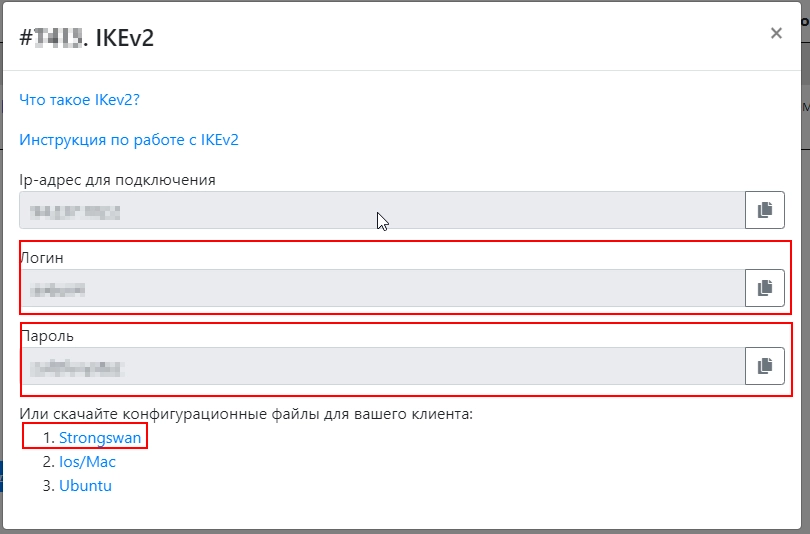
Importez le fichier dans strongSwan et saisissez votre nom d’utilisateur ainsi que votre mot de passe.
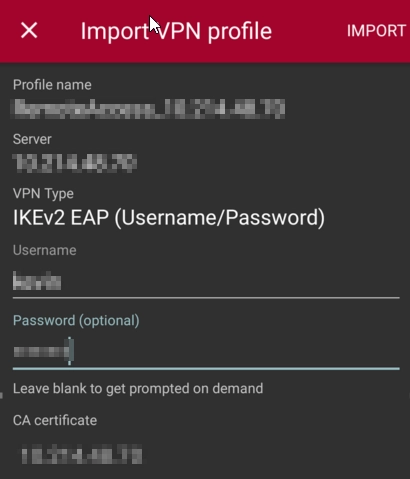
Votre appareil est maintenant prêt à se connecter.
Éditeur : vpn.how