Corporate SSO and VPN: Entra ID, Keycloak, ALD Pro — The Complete 2026 Guide
Step-by-step integration of corporate SSO and VPN with Microsoft Entra ID, Keycloak, and ALD Pro. Architectures, protocols, checklists, common mistakes, practical cases, and tools. Enterprise-grade material presented clearly with a strong focus on security.
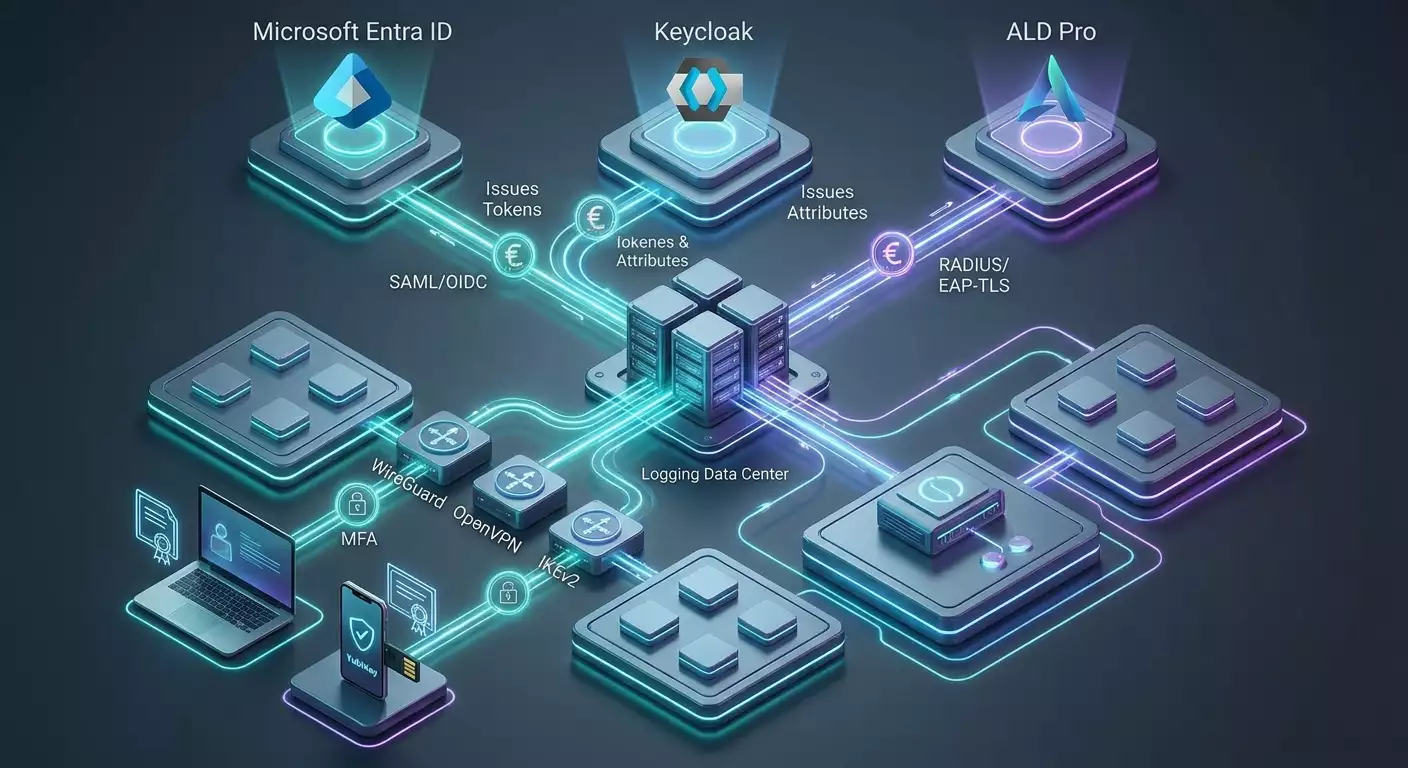
Content of the article
- Introduction: why it matters now
- Basics: key concepts you can’t skip
- Deep dive: advanced topics for architects
- Practice 1: architectural patterns and strategy choices
- Practice 2: microsoft entra id — three working scenarios
- Practice 3: keycloak as a universal vpn idp
- Practice 4: ald pro — directory integration with radius and ikev2
- Practice 5: access policies, segmentation, and dns
- Practice 6: mfa, conditional access, and compliance control
- Practice 7: operations, auditing, and incident response
- Common mistakes that break security and ux
- Tools and resources: building your solution
- Cases and outcomes: what works in real life
- Faq: advanced questions
- Conclusion: moving from pilot to production
Introduction: Why It Matters Now
Remote access is no longer optional; it’s become the new normal. Between 2020 and 2026, industry surveys show that 40–55% of employees work at least one day a week outside the office. Yet over 60% of incidents on remote devices stem from weak authentication or lack of contextual security checks. Combining corporate SSO with VPN addresses this perfectly: unified accounts and access policies, multifactor authentication, device health checks, and end-to-end visibility.
This guide gives you the full picture—from core concepts to practical setups with Microsoft Entra ID, Keycloak, and ALD Pro. We’ll walk through SAML and OIDC architectures, EAP-TLS with RADIUS, MDM and PKI integration, plus typical errors, tools, and real-world examples. The goal is simple: prepare you to deploy a scalable, auditable production architecture that withstands the cyber threats of 2026.
Basics: Key Concepts You Can’t Skip
SSO and Stakeholders
SSO (Single Sign-On) lets users sign in once to access multiple apps and services. The main players are the IdP (Identity Provider) who issues credentials, and the SP/RP (Service Provider/Relying Party) that trusts the IdP. In our context, the SP is your VPN gateway or remote access broker, which trusts attributes from IdPs like Entra ID, Keycloak, or ALD Pro via federation.
Protocols: SAML, OIDC, OAuth2
- SAML 2.0 exchanges assertions using XML; it’s commonly supported out-of-the-box by enterprise VPN gateways.
- OIDC builds an identity layer on top of OAuth2, ideal for web brokers and modern VPN config portals, including temporary tokens.
- OAuth2 handles delegated authorization, serving as the transport for OIDC.
RADIUS and the EAP Family
RADIUS is a classic protocol for network authentication and authorization. Built on RADIUS are EAP (Extensible Authentication Protocol) methods. For enterprise-class setups, EAP-TLS (mutual certificate auth) is recommended; less frequently, PEAP/EAP-TTLS with passwords. The EAP-TLS + RADIUS combo offers the best balance of security and manageability.
VPN Protocols and Their Role
- WireGuard is modern, lightweight, and fast. It lacks native SSO but integrates through brokers and key orchestration.
- OpenVPN offers flexible TLS-based connectivity, a mature ecosystem, and native SAML/OIDC plugins in some products.
- IKEv2/IPsec is the corporate standard, excellent with EAP-TLS and hardware gateways, supported by OSes and mobile devices alike.
- L2TP/SSTP are legacy protocols used mainly for backward compatibility but being phased out by IKEv2 and SSL-based solutions by 2026.
Zero Trust and Conditional Access
Zero Trust Network Access (ZTNA) and Conditional Access mean no trust by default — evaluate context (user, device, location, risk), and enforce MFA. The 2026 trend is Continuous Access Evaluation: if a device becomes non-compliant, its access is dynamically restricted.
Deep Dive: Advanced Topics for Architects
User and Device Identity
Strong authentication involves not just the user persona but also device identity. Best practice: issue a certificate to the device (via MDM/Intune) and enable SSO with MFA for the user. VPN gateways validate both factors—EAP-TLS confirms the device, SAML/OIDC verify the user and their risk level.
PKI and Certificate Lifecycle
- Choose your root CA: AD CS, EJBCA, or HashiCorp Vault PKI.
- Automate issuance with SCEP/NDES/Intune; auto-renew certificates 30–45 days before expiry.
- Use CRL/OCSP and enforce revocation checks. For NATed laptops, implement OCSP stapling or proxy.
Segmentation and Least Privilege
VPN shouldn’t revert you to flat networking. Adopt micro-segmentation and policy-based routing: users land in IP ranges tied to roles (RBAC/ABAC). Access to services goes through group ACLs, never static allow-all rules.
Observability and Compliance
Aggregate authentication logs from IdP, RADIUS, and VPN concentrators into SIEM. Access reports should show who accessed what, when, and from where. For regulation like Russia’s 152-FZ, store personal logs on-site, use rotation and WORM schemes for legal validity.
Performance and Reliability
- Encryption: use modern cipher suites (TLS 1.2/1.3, AES-GCM/ChaCha20-Poly1305); disable outdated protocols.
- Scaling: active-active clusters, BGP/ECMP routing, split RADIUS responsibilities.
- Global availability: host regions near users, Anycast DNS, design around geopolitical traffic restrictions.
Practice 1: Architectural Patterns and Strategy Choices
Pattern A: SAML/OIDC on the VPN Gateway
Ideal when your gateway supports native SAML/OIDC plugins. Users authenticate via browser SSO (with MFA and CA), the gateway receives assertions and maps groups to profiles (IP ranges, routes, ACLs). Quick to deploy and user-friendly.
Pattern B: RADIUS + EAP-TLS
The gateway delegates certificate verification to RADIUS. Perfect for IKEv2. Use MDM to issue client certificates. RADIUS attributes define pools and policies.
Pattern C: Combining User SSO and Device Trust
Connection uses EAP-TLS (device cert), but user verification happens through SAML/OIDC on an application-level proxy or publication portal. Segmentation applies on both device and user axes.
Design Checklist
- Define your perimeter: which subnets and apps are needed remotely, which are not.
- Choose your IdP: Entra ID, Keycloak, ALD Pro (direct or federated).
- Decide on PKI and certificate issuance strategy.
- Select VPN type and clients: IKEv2/OpenVPN/WireGuard with device support in mind.
- Set up access policies: groups, attributes, device compliance, geofencing, risk levels.
- Plan logging: end-to-end authentication tracing, retention, and analytics.
- Ensure HA/DR: gateway clusters, IdP replication, resilient RADIUS.
Practice 2: Microsoft Entra ID — Three Working Scenarios
Scenario 2.1: SAML from Entra ID directly to the VPN Gateway
Who it’s for: FortiGate, Palo Alto, Cisco, OpenVPN platforms supporting SAML, plus remote access brokers.
Setup Steps
- Create an Enterprise Application in Entra ID with SAML type. Fill in Identifier and Reply URL from your VPN gateway (the SP entity).
- Configure assertion mappings: NameID, groups (e.g., 'groups' filtered by security groups), optionally department, deviceid.
- Enable MFA and Conditional Access policies enforcing device compliance (Intune compliant), block TOR/VPN IPs, and apply geofencing rules.
- Import IdP metadata (signing certificate, SSO URL) to VPN gateway; map groups to policies (Group A — Dev subnet, Group B — ERP, etc.).
- Run a pilot with 5–10 users, verify SSO, MFA, authorization, and logging. Then proceed with phased rollout.
Validation Checklist
- SAML signatures and assertion lifetimes are correct (maximum 2–3 minute clock skew).
- Group memberships fit token size limits (for many groups, use group filters or application roles for claims).
- Connections are logged in Entra ID sign-in logs and on VPN gateway SIEM.
Scenario 2.2: Entra ID + NPS Extension MFA (RADIUS)
Who it’s for: When the gateway supports RADIUS/EAP but not SAML. Add NPS with MFA Extension to enforce second factor and conditional access.
Setup Steps
- Deploy Windows NPS, install NPS Extension for Azure MFA, connect it to Entra ID.
- Create RADIUS policies requiring at least EAP-TLS or PEAP; enable logging to text files and Event Log.
- Configure VPN gateway to use NPS as RADIUS AAA server; set MFA timeouts (30–60 seconds recommended).
- Set Conditional Access in Entra ID so RADIUS authorization requires MFA or device compliance.
Pros and Cons
- Pros: Works with a broad range of hardware gateways and centralizes MFA enforcement.
- Cons: Browser SSO isn’t used; UX depends on MFA method and supported EAP types. PEAP increases password weaknesses compared to EAP-TLS.
Scenario 2.3: EAP-TLS via Intune + IKEv2/SSL
Who it’s for: When device control is critical. Devices get certificates via Intune (SCEP/PKCS). Supported on Windows, macOS, iOS, Android.
Setup Steps
- Deploy PKI (AD CS or external), configure NDES/SCEP for Intune.
- Create certificate profiles (client authentication) in Intune, assign to device groups.
- Enable EAP-TLS on RADIUS (FreeRADIUS or NPS), specify root CAs and allowed EKUs.
- On VPN gateway, enable IKEv2 or SSL-TLS profile requiring client certificates; map RADIUS attributes to address pools and ACLs.
- Implement device compliance checks via Intune and Conditional Access: non-compliant devices don’t receive certificates or get blocked by policy.
Quality Control
- Certificate revocation is recognized in CRL/OCSP within 5–10 minutes.
- Certificate rotation auto-heals tunnels without user intervention.
- Segmentation by OU/device groups is enforced through RADIUS policies.
Practice 3: Keycloak as a Universal VPN IdP
When to Choose Keycloak
If you need flexibility, on-prem deployment, open-source, extensibility, LDAP/AD/ALD Pro federation, attribute mappers, and WebAuthn/TOTP. Keycloak offers fine-tuned role and authentication flow control, including risk-based models and contextual policies.
Scenario 3.1: SAML/OIDC to OpenVPN/Pritunl/SSL Gateways
- Deploy Keycloak HA cluster (2–3 nodes, external DB cluster), enable backups and health monitoring.
- Create a Realm, configure clients with SAML or OIDC for your VPN gateway or broker (e.g., OpenVPN Access Server, Pritunl, certain UTM appliances).
- Set up mappers: groups, roles, department, clearance. Minimize token size with OIDC UserInfo and micropolicies.
- Enable MFA: primary WebAuthn, fallback TOTP; set up step-up for elevated risk scenarios.
- Import IdP metadata on the gateway; map groups to tunnel profiles.
Scenario 3.2: Federation of Keycloak with LDAP/AD/ALD Pro
- Enable User Federation: LDAP connection to AD or ALD Pro over LDAPS only; configure scheduled and on-demand sync.
- Verify attribute schema: memberOf, departmentNumber, custom attributes for VPN policy mapping.
- Optionally enable SCIM provisioning from external HR/IdM systems to Keycloak.
Scenario 3.3: WireGuard with Ephemeral Keys via Portal
Since WireGuard lacks native SSO, use a portal with OIDC/SAML where users authenticate via SSO and receive temporary WireGuard config/keys (rotated every 8–24 hours). The server side auto-updates client public keys. For production, add device binding and OS certificate validation.
Mini Checklist
- Portal holds minimal secrets; keys are one-time or short-lived.
- All artifacts are logged and auditable with enforced revocation.
- Keycloak groups map to WireGuard policy-sets (routes, DNS, server ACLs).
Practice 4: ALD Pro — Directory Integration with RADIUS and IKEv2
ALD Pro Highlights
ALD Pro is a corporate directory and domain service in the Astra Linux ecosystem supporting LDAP/Kerberos, role-based policies, and unified accounts. VPN setups often use FreeRADIUS + LDAP to ALD Pro combined with IKEv2 on strongSwan or hardware gateways.
Scenario 4.1: FreeRADIUS + EAP-TLS
- Deploy a CA (built-in or external), issue client certificates to business devices, and set up CRL/OCSP.
- Configure FreeRADIUS: enable eap/ttls/tls modules, import CA chain. Add LDAP module connected to ALD Pro over LDAPS; use group attributes for filtering.
- Configure strongSwan IKEv2 with leftauth=pubkey and rightauth=eap-tls. Set RADIUS as AAA backend; map groups to IP pools and install policies.
- Clients (Windows/macOS/iOS/Android) use IKEv2 profiles requiring client certs with CN/SAN checking.
Scenario 4.2: FreeRADIUS + PEAP/TTLS (Transitional)
If PKI isn’t ready, use password-based PEAP/EAP-TTLS with LDAP backend to ALD Pro temporarily. Require strong passwords, MFA at IdP level (via Keycloak frontend if available), and server TLS pinning for RADIUS. Plan to migrate to EAP-TLS within 3–6 months.
Scenario 4.3: Federation ALD Pro -> Keycloak -> VPN
Use ALD Pro as the user source (LDAP), Keycloak as the IdP (SAML/OIDC), and VPN gateway as SP. This provides SSO and enhanced MFA, while user accounts and groups remain managed in ALD Pro.
Security Checks
- Encrypt only with LDAPS and verify directory cert validity.
- Restrict LDAP bind accounts by IP and permissions.
- Synchronize employee offboarding and VPN revocation promptly.
Practice 5: Access Policies, Segmentation, and DNS
Groups, Roles, and Attribute-Based Authorization
Define minimal necessary privilege sets: developers, finance, contractors, admins. Translate IdP attributes (group, division, risk tags) into RADIUS/VPN policies. For sensitive areas, require step-up authentication like repeated MFA or separate tunnels.
Split Tunnel and Routing
- Default to split-tunnel incorporating only needed subnets to reduce load.
- Use full tunnel for admin roles or high-risk scenarios.
- Experiment with dynamic ACLs based on risk levels from IdP attributes.
DNS and Internal Names
Use corporate DNS inside tunnels, DNSSEC when possible, and sinkhole filtering for malicious domains. Watch for DNS leaks. Multi-region deployments benefit from geo-distributed resolvers and nearby split zones.
Practice 6: MFA, Conditional Access, and Compliance Control
MFA: WebAuthn as the 2026 Standard
WebAuthn/FIDO2 is the baseline; TOTP/SMS serve only as backup. Require two independent factors for admins. Set risk policies: unknown devices or unusual locations trigger mandatory step-up.
Device Compliance
Integrate MDM/Intune checks: disk encryption, active EDR, updates no older than N days, no forbidden processes. Non-compliant devices either don’t receive certificates (EAP-TLS) or face restricted access groups.
Continuous Access Reevaluation
Enable Continuous Access Evaluation where possible: access is revoked in real-time on compromised accounts or device loss, tunnels drop, and keys are invalidated.
Practice 7: Operations, Auditing, and Incident Response
Observability and Metrics
- Monitor levels: IdP sign-ins, RADIUS auths, VPN session stats, netflow.
- Track SLOs: authentication success rate, median handshake time, drop rate, tunnel uptime.
- Detect anomalies: spikes in failed logins, unknown geolocations, nighttime admin access.
Secret and Certificate Rotation
Rotate VPN server keys every 6–12 months, client certificates likewise with auto-renew 30–45 days prior. Conduct regular pentesting and encryption suite reviews. Manage changes through strict change requests and rollback plans.
Response Plan
- Account compromise: immediately revoke IdP sessions, block user, manually revoke VPN access if needed.
- Device loss: add to blocklist, revoke certificate, trigger EDR playbook.
- Cluster failure: redistribute via GSLB/Anycast; perform DR tests every six months.
Common Mistakes That Break Security and UX
- MS-CHAPv2 without TLS: vulnerable to offline password recovery. Use at least PEAP, ideally EAP-TLS.
- Single factor only: without MFA, phishing and token theft are inevitable.
- Flat networks: giving full access to all. Use segmentation and role-based ACLs.
- No revocation checks: tunnels persist with revoked certificates. Configure CRL/OCSP.
- Poor split-tunnel setup: DNS leaks and DLP/EDR bypasses. Verify routes and resolvers.
- Weak ciphers: supporting old protocols for “compatibility” invites attacks.
- No logging: without end-to-end logs, incident investigations are nearly impossible.
- Token bloat (SAML groups): overly large assertions break logins. Use app roles and filtering.
- No HA/DR: single points of failure in IdP/RADIUS/VPN.
Tools and Resources: Building Your Solution
VPN Concentrators and Stack
- IKEv2/IPsec: strongSwan, Libreswan, enterprise-grade hardware gateways.
- OpenVPN: OpenVPN Access Server and many derivatives support SAML/OIDC on some platforms.
- WireGuard: bare implementations or brokers with key orchestration, integration with SSO through portals.
- SSL/DTLS: OpenConnect-compatible, some UTM/NGFW appliances.
Identity and Federation
- Microsoft Entra ID: SAML/OIDC, Conditional Access, SCIM, NPS Extension MFA.
- Keycloak: open platform, WebAuthn/TOTP, flexible mappers, LDAP federation.
- ALD Pro: directory and domain services, LDAP/Kerberos integration, paired with RADIUS.
RADIUS and PKI
- FreeRADIUS, NPS: authentication, attribute-based authorization, auditing.
- PKI: AD CS, EJBCA, HashiCorp Vault, automated SCEP/NDES.
Device Management and Security
- MDM/EMM: Intune, enterprise-class UEM solutions.
- EDR/SIEM: VPN/IdP/RADIUS log integration and event correlation.
Fast Pilots and POCs
During piloting, getting a working VPN with SSO up in hours—not weeks—and bypassing complex procurement is key. The vpn.how service offers a quick-start option: personal, non-shared VPN servers with dedicated customer IPs, supporting WireGuard, OpenVPN, IKEv2, L2TP, SSTP (task-based choices). Server locations cover key Russian and global cities (Moscow, St. Petersburg, Amsterdam, Frankfurt, London, New York, San Jose, Chicago, Singapore, Sydney, Madrid, Helsinki, Stockholm, Warsaw, Copenhagen, Stavanger), payment via Russian bank cards including Tinkoff and Ozon, SBP, and cryptocurrencies (USDT/BTC). Rates start at 490 ₽ per day or 2490 ₽ per month with discounts for longer terms, auto-launch within ~5 minutes after payment, and no logs. This lets pilots focus on IdP integrations (Entra ID/Keycloak/ALD Pro). For production, switch to your own infrastructure or GOST-VPN-class solutions as regulatory demands require.
Cases and Outcomes: What Works in Real Life
Case 1: International Product Company, 1500 Employees
Challenge: unified access to corporate apps and Kubernetes clusters with role-based segmentation and low latency.
Solution: Pattern A — SAML from Entra ID to FortiGate and developer portal, Conditional Access tied to Intune device compliance. Split-tunnel routing, Anycast DNS. IP pools and ACLs linked to Entra ID groups.
Results (6 months): initial connection time reduced from 25 to 7 minutes, VPN service desk calls dropped by 48%, no DNS-leak incidents, 99.97% uptime.
Case 2: Industrial Group, 6000+ Workstations, Russia-Wide
Challenge: compliance with internal standards, on-prem IdP, strict device control.
Solution: Pattern B — EAP-TLS on IKEv2/strongSwan, FreeRADIUS + LDAP to ALD Pro. Certificates via corporate PKI with automated issuance. Segmentation by shop floors and offices, step-up MFA with Keycloak for access to critical processes.
Results (9 months): zero VPN credential compromise incidents, investigation time cut by 3x via end-to-end logs, zero downtime from certificate revocation.
Case 3: Fintech Startup, 220 Employees, Multi-Cloud
Challenge: fast, secure access to internal APIs and admin panels with flexible role and attribute models.
Solution: Keycloak as IdP, SSO into Pritunl (OpenVPN and WireGuard), ephemeral WireGuard configs via OIDC portal with 12-hour key rotation. Device checks through MDM, production access only via registered laptops.
Results (3 months): new hire onboarding to working access in 30 minutes, failed logins dropped 65% after WebAuthn rollout, API access audit near real-time in SIEM.
FAQ: Advanced Questions
Can You Do SSO with WireGuard?
Not natively. The practical approach is via a broker or portal: users authenticate via SAML/OIDC, get short-lived WireGuard config and keys; the server updates the client public key dynamically. For production, add device binding and auditing.
Which is Faster: WireGuard or IKEv2?
On the same hardware, WireGuard offers lower latency and CPU load thanks to streamlined cryptography (ChaCha20), but IKEv2 is more native to EAP-TLS and integrated into OSes. Choose based on client ecosystem and compliance needs.
Should L2TP/SSTP Be Retained for Compatibility?
Only temporarily. By 2026, these protocols are legacy. Plan migration to IKEv2/OpenVPN/WireGuard.
How to Scale Authentication?
Separate concerns: deploy IdP clusters, use active-active RADIUS, cache attributes, implement CDNs for static IdP resources, and run VPN clusters with ECMP/BGP. Keep MFA check times under 1–2 seconds.
Can You Skip Certificates?
Possible but not recommended. Passwords—even with MFA—are more vulnerable to phishing. Combining device certificates (EAP-TLS) with user SSO greatly enhances resilience.
How to Handle Offline MFA?
Set up fallbacks: hardware keys supporting offline signatures, one-time recovery codes, grace policies with reduced privileges. All offline scenarios must be logged and time-limited.
What About IPv6?
Plan dual-stack addressing (IPv4/IPv6), ACLs, and routes for both. Use DNS64/NAT64 if needed. Verify encryption and filtering policies work equivalently on IPv6.
How Often to Rotate Server Keys?
Every 6–12 months, plus immediate reissue on suspected compromise. Client certificates follow the same schedule with automatic renewal.
How to Layer ZTNA on VPN?
Keep VPN as a transparent conduit to minimal necessary subnets; publish app access via proxies enforcing SSO and application-layer policies. This combines network and application segmentation.
Where to Store Logs for Auditing?
Centralize them in SIEM with a retention of at least 6–12 months. For personal data, localize storage per regulations, restrict access by role, and use immutable storage for legal compliance.
Conclusion: Moving from Pilot to Production
We’ve covered everything from basics to advanced strategies with Entra ID, Keycloak, and ALD Pro, explored SAML/OIDC, EAP-TLS, RADIUS, segmentation, Conditional Access, and operations. Next steps:
- Define access models by roles and applications.
- Choose your architectural pattern: SAML on gateway, EAP-TLS, or a hybrid.
- Determine your IdP strategy: Entra ID for cloud agility, Keycloak for on-prem customization, ALD Pro as corporate directory with RADIUS.
- Launch a pilot in a defined perimeter and measure UX and security metrics.
- Establish PKI policy and automate certificate lifecycle management.
- Plan for HA/DR and implement end-to-end logging.
- Categorize applications, enable step-up MFA for sensitive zones.
The key is discipline and iteration. Start with a pilot tied to strict metrics, then roll out in stages with regular penetration testing. Use strong methods (EAP-TLS, WebAuthn), segment access, and automate lifecycle. In 2026, winners are architectures where identity and context govern access and the network merely carries the trust token.